CargoWise & ERP read-only portal
Migrating your ERP? Keep your old data one click away.
You're in the right place. We build a secure read-only portal for all your old CargoWise or ERP data.
- Read-only, nothing can change
- All documents and history
- Reports in Excel
Why a read-only portal
Strictly read-only
No New, Edit, Save or Delete button anywhere. Your CargoWise history stays exactly as it was.
Every record, every document
Shipments, consols, POs, containers and organizations, with all attached files and event history.
Reports finance can use
Job profit, AP and AR, trial balance, P&L, balance sheet and journal, downloaded in Excel.
Your new system starts fresh. Your history stays in CargoWise.
Migrations move what you need to keep working. Years of closed jobs, documents and accounts usually stay behind, and someone will ask for them.
Your new system
Usually moves across at go-live- Open and in-transit shipments
- Customers, vendors and agents
- Opening ledger balances
- Current rates and contracts
CargoWise
Usually stays behind- Closed shipments, consols, POs and containers
- Attached documents and event history
- Job profit by job and charge code
- Journals and past-period accounts
"Send us the journal and trial balance for last year."
Pick the period and download both in Excel.
"We never got this invoice. Show us the proof."
Find the job and download every document as one ZIP.
"When did this container gate out, and who handled it?"
Open the event log: each step with time and user.
Why pay more to move data you only need to look at?
Moving years of old CargoWise data into a new system costs money and time, and the decision keeps getting pushed back. There is a simpler way. Digital Hoop builds you a dedicated read-only portal with all your old data in it, easy to find from day one.
Your money stays in your pocket
Move only live work to the new system. Old jobs, documents and accounts stay where they are and open in your read-only portal.
Your time is saved
No long clean-up or mapping project for closed jobs. Your team finds any old record in seconds.
Drill down and explore
Click from a shipment to its consol, POs, containers and documents. Filter any report by branch, period or customer.
Everything you can still look up
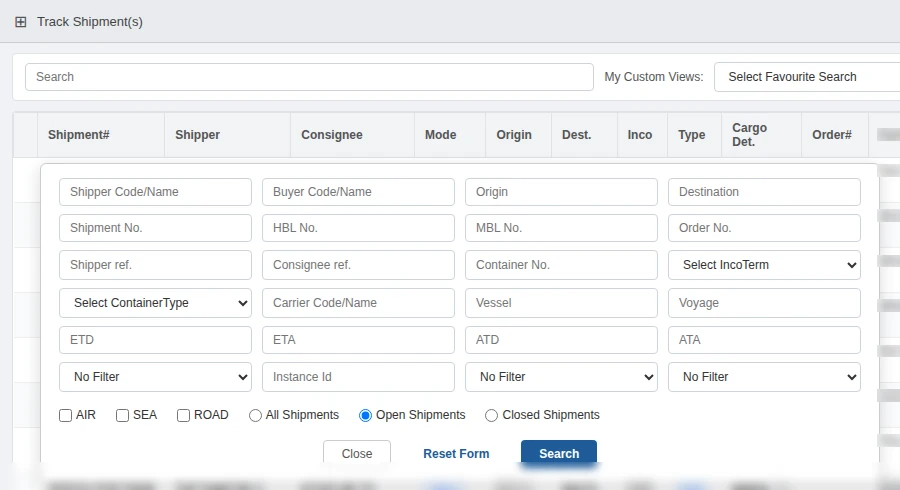
Start from any old shipment. Its consol, purchase orders, containers, documents and history are one click away. Customer details in the screenshots are blurred.
Find any past shipment in seconds
Search with several fields at once and switch between open and closed jobs. No CargoWise training needed.
- Shipper, consignee, HBL, MBL, container, order
- Vessel, voyage, ETD, ETA, ATD and ATA
- Air, sea and road · save searches · export
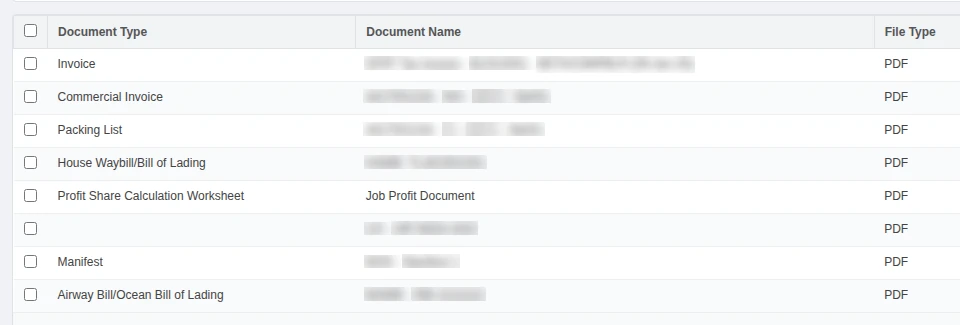
Every document, still attached to its job
Invoices, packing lists, house and master bills, manifests and more, exactly as they were filed in CargoWise.
- Download one file or the whole set as a ZIP
- Fetch AR documents by country code
- Consol and PO documents too
A full audit trail for every shipment
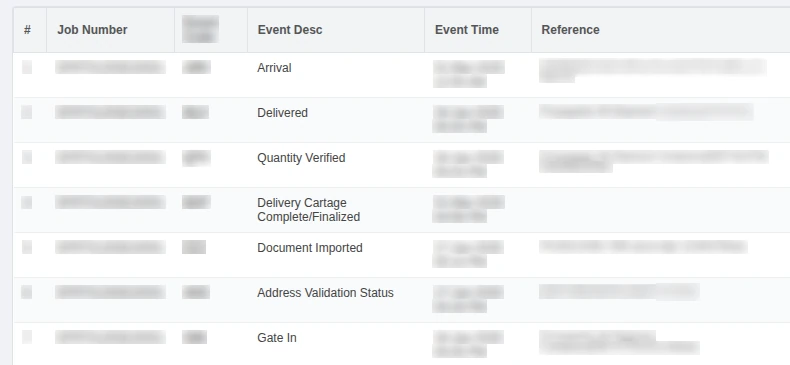
When a claim or customs query comes in, the answer is in the event log, with the person behind each step.
- Pick-up, gate in and out, arrival, delivery
- Document imports and workflow steps
- Event code, time, reference and user
Your full customer and vendor master
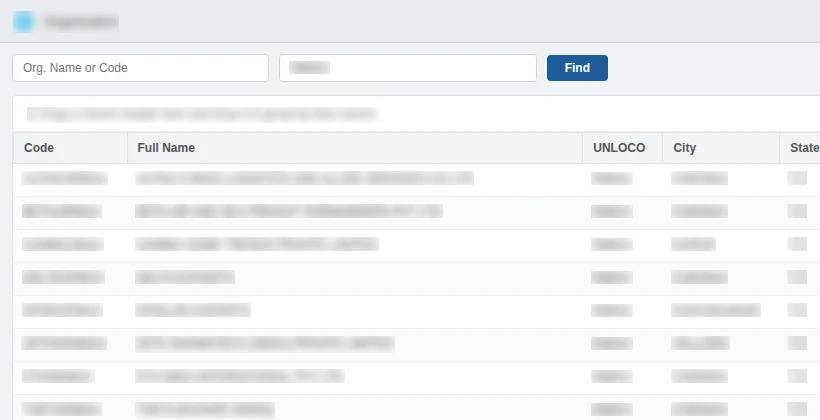
Shippers, consignees, carriers, agents and vendors with the terms you agreed with each of them.
- Search by name or UNLOCO code
- Addresses, contacts and staff assignments
- AR credit terms and AP payment terms
Consolidations
Linked shipments, leg-by-leg routing, MBL, manifest and booking confirmation. Opens from the shipment.
Purchase orders
Order lines with goods, quantity, volume and weight, linked shipments and PO documents.
Containers
Shipments packed inside, vessel and voyage, milestone dates, weight, volume and seal numbers.
CargoWise financial reports, for every year you ran on it
Your new system starts from opening balances. The read-only portal gives finance the detail behind them. Choose the filters, then download a formatted Excel file.
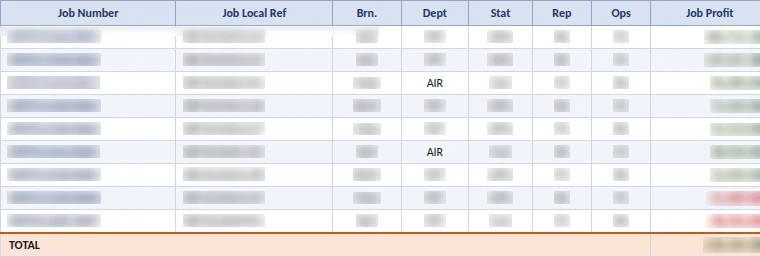
Job profit report
Compare old margins with your new systemRevenue, cost, accrual and profit for every job. One sheet by job, one by charge code. Losses show in red.
- Filters
- Branch, date range, job status and type, sales rep, operator, client, agent
- Output
- Excel with two sheets
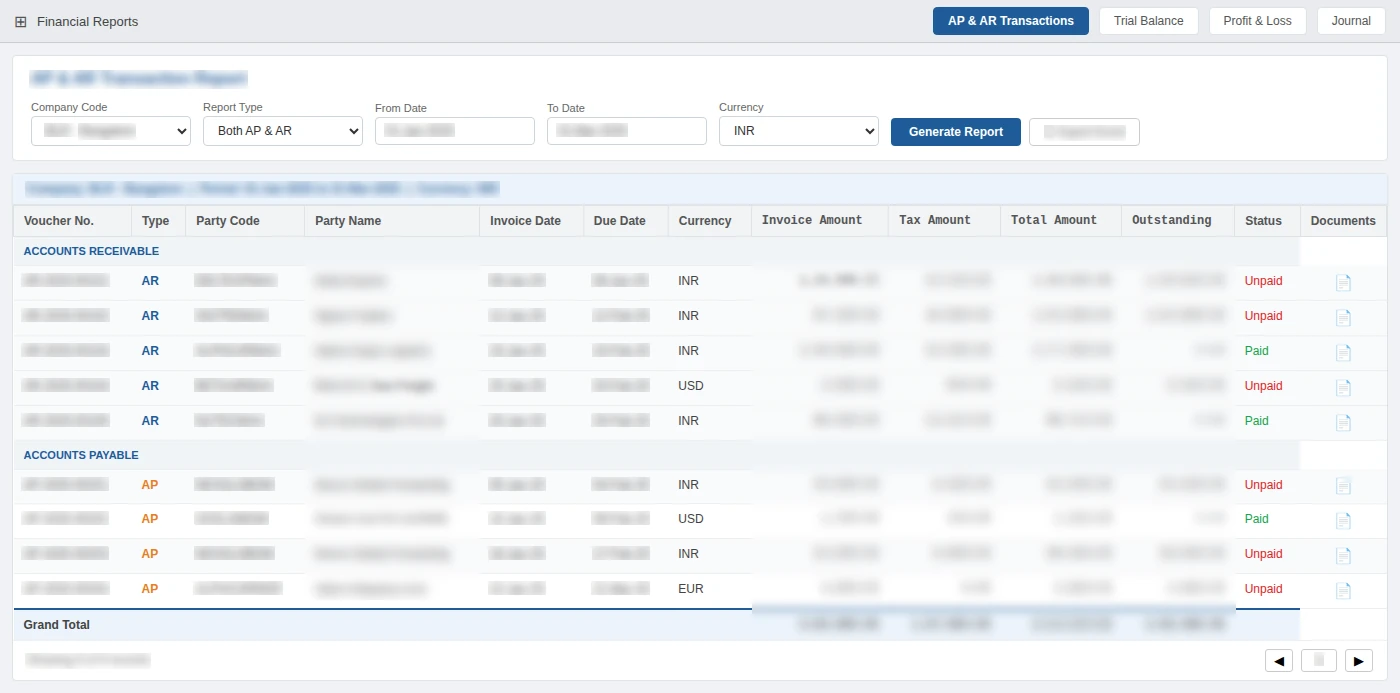
AP & AR transactions
Chase old receivables, settle disputesPayables and receivables on screen, with the invoice, credit note or receipt behind every line.
- Filters
- Company, AP, AR or both, date range, currency
- Output
- On-screen list with documents, plus Excel export
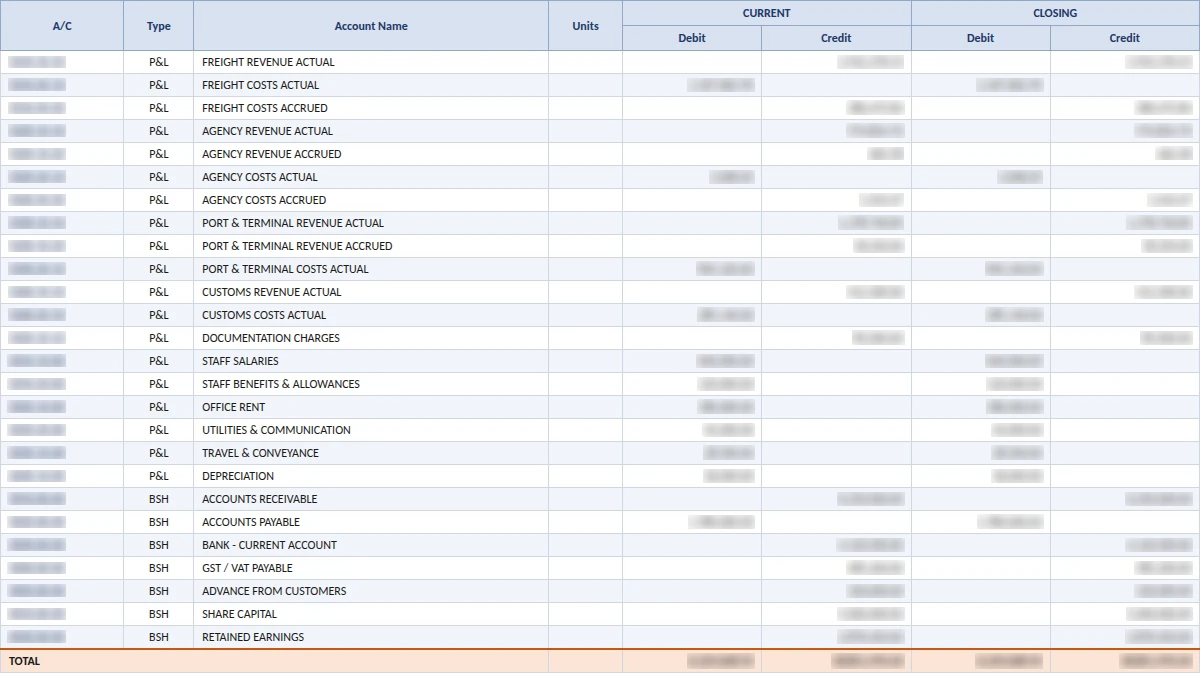
Trial balance
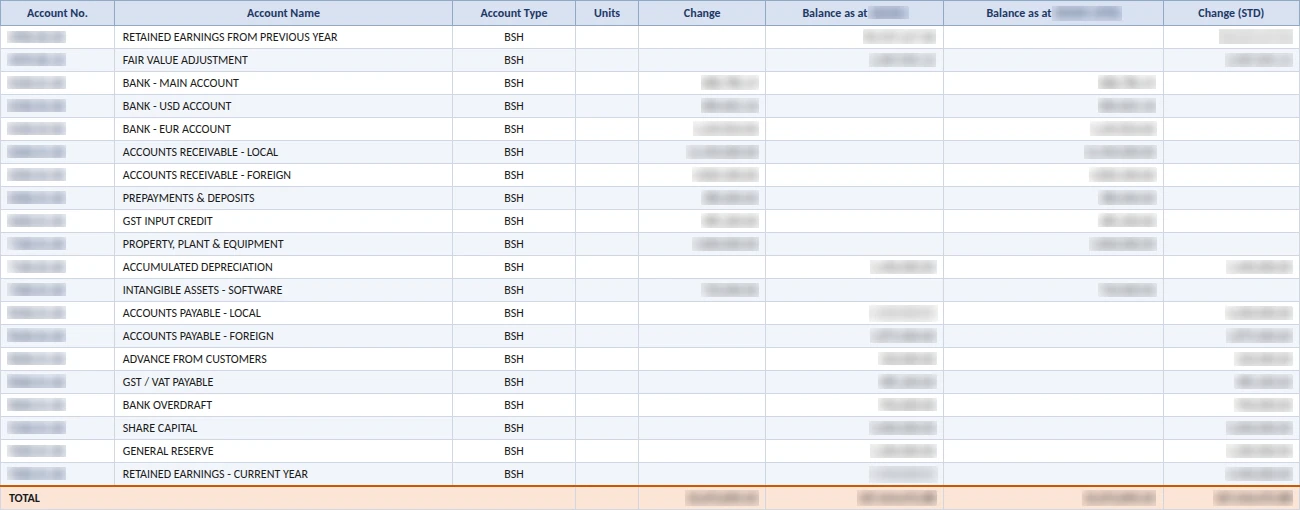
Audits and checking opening balancesAll GL accounts with opening balances, period debits and credits, and closing balances.
- Filters
- Branch, dates, currency, zero balances, roll-up level
- Output
- Excel in the standard CargoWise layout
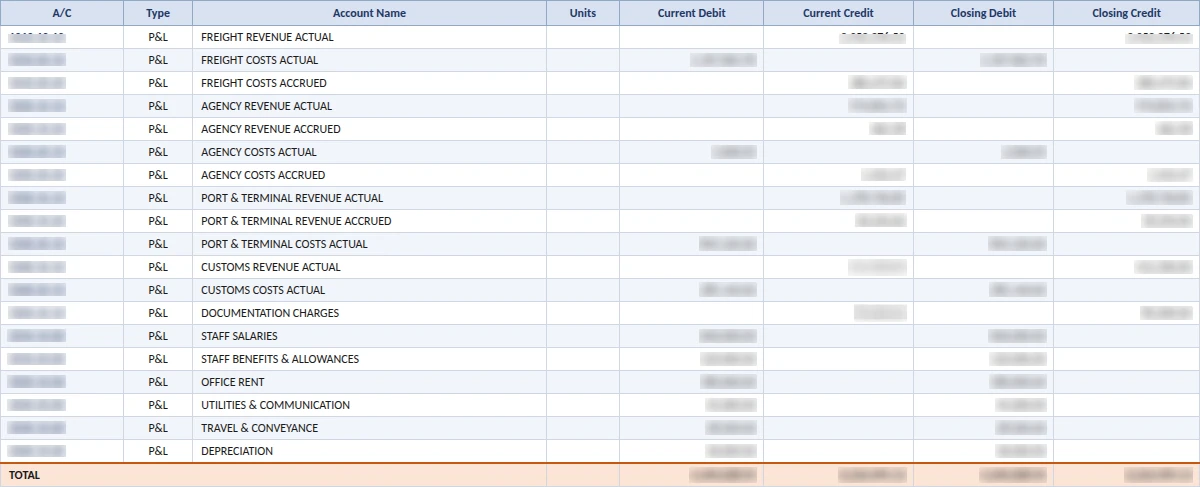
Profit & loss
Year-on-year comparisons across both systemsGross profit, operating expenses and net profit, with an optional prior-period column.
- Filters
- Branch, dates, currency, compare period
- Output
- Formatted Excel
Balance sheet
Statutory filings, bank and investor requestsAssets, liabilities and equity as at any date you ran on CargoWise.
- Filters
- Branch, reporting date, currency, roll-up level
- Output
- Excel in the standard CargoWise format
Journal report
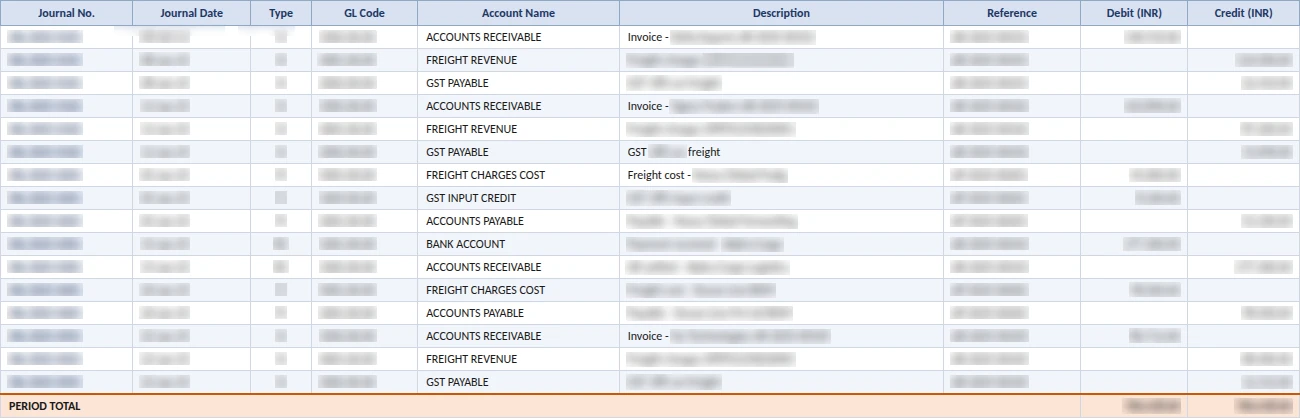
Answer auditors line by lineEvery journal entry posted in CargoWise for the period, with the user who posted it.
- Filters
- Branch, dates, journal type, GL account
- Output
- Excel with date, number, GL code, debit, credit and user
Your history, exactly as it was on the last day
Nobody can change an old job, a posted journal or a customer's terms by mistake. That makes the portal safe to hand to auditors, clients and new staff.
Not in the portal
What users can do
Finance and audit
"Where did this number come from?"
Journals, trial balance, P&L and balance sheet for every CargoWise year.
Customer service
"Can you resend that old invoice?"
Find the job by HBL, order or container and send the documents in a minute.
Management
"Were these lanes better before?"
Job profit by branch, sales rep, operator, client or agent for any past period.
Compliance and claims
"Prove when this happened."
Event history with times and users, plus the original documents.
How the portal fits your move off CargoWise
Set it up before go-live, so nobody loses access to old data on switchover day.
- Before you switch
Map what stays behind
We review your migration plan and agree which CargoWise history the portal should cover.
- Set-up
We set up your portal
Digital Hoop sets up the portal on your CargoWise data and adds your users.
- Go-live
Switch with confidence
New work runs in the new system. Old work is checked in the portal.
- Years after
Look things up any time
Audits, disputes and old reports stay a search away.
Three ways to handle your CargoWise history
| Need | Keep full CargoWise seats | Export to spreadsheets and PDFs | Read-only portal |
|---|---|---|---|
| Find an old shipment | Yes | Hunt through folders | Search by HBL, MBL, container, order |
| Open its documents | Yes | Only if exported and filed | Single file or full ZIP |
| Run a past trial balance or P&L | For trained users | Only versions you saved | Any period, in Excel |
| Shipment event history | Yes | Usually lost | Full log with users and times |
| Risk of changing records | Depends on user rights | Files can be edited | None, view only |
| Who can use it | Trained CargoWise users | Whoever finds the file | Anyone you add, in a browser |
Questions from teams migrating CargoWise
What happens to our CargoWise data when we move to another system?
Most migrations move open jobs, customers and opening balances. Closed shipments, attached documents, event history and past-period accounting usually stay in CargoWise. Our read-only portal keeps that history easy to view and search.
Can we still see CargoWise reports after we leave CargoWise?
Yes. The read-only portal produces job profit, AP and AR transactions, trial balance, profit and loss, balance sheet and journal reports from your CargoWise accounting data, and downloads most of them as Excel files.
Can anyone change the old records in the portal?
No. The portal has no New, Edit, Save or Delete buttons. Users can search, view, download and export, so your history stays exactly as it was.
Do portal users need a CargoWise login?
No. Users sign in to the read-only portal in a web browser. People who only need to look up past data do not need a full CargoWise login.
Can we start using the portal before we switch systems?
Yes. You can set it up while still on CargoWise so staff and clients are used to it before go-live on the new system.
Need support during your migration? We're one call away.
Talk to our team and get a clear answer for your old CargoWise data, fast. So why wait?
